Recipe Parameters
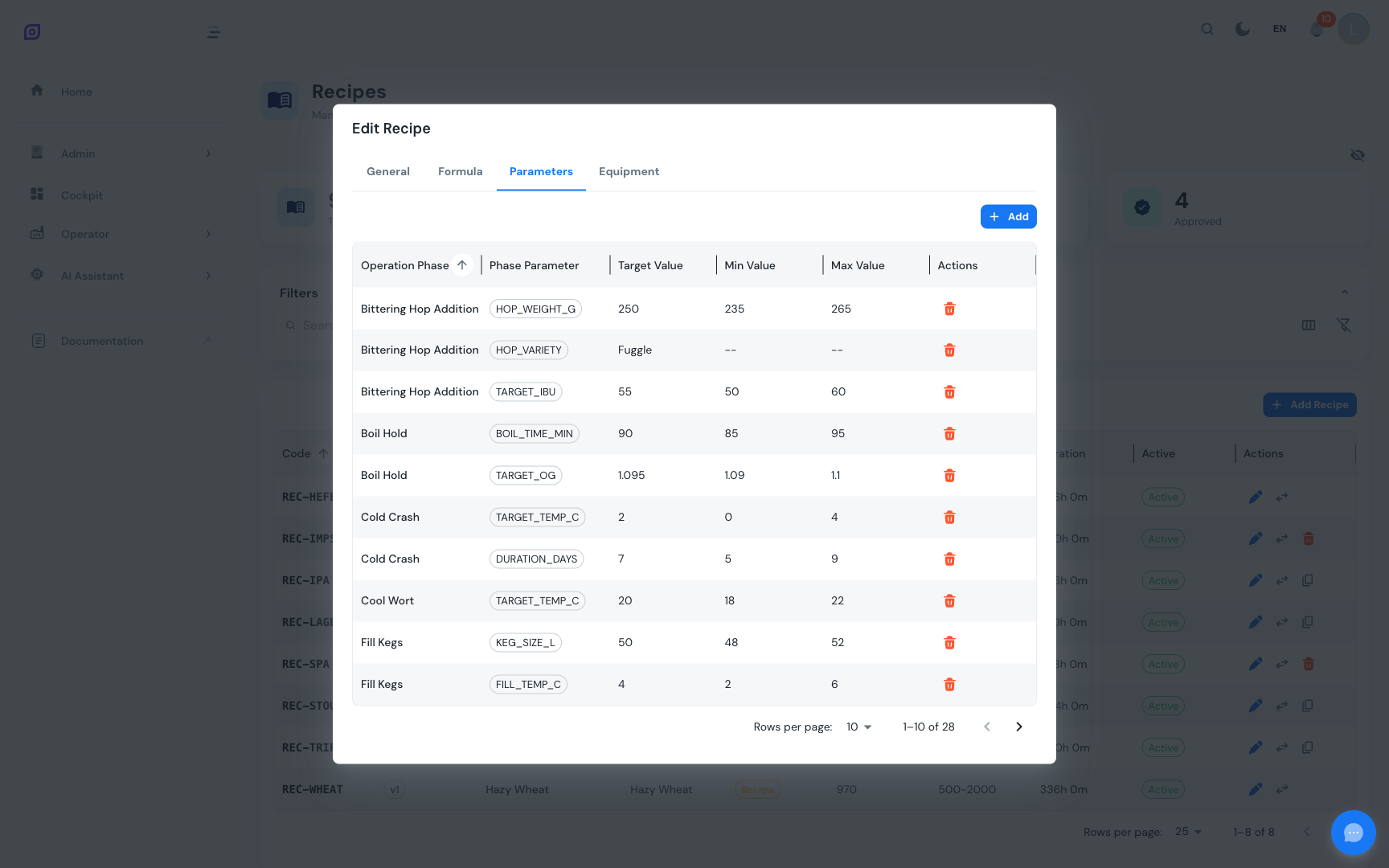
Recipe parameters are phase-specific setpoint overrides. They connect the recipe to the procedure's operation phases and define the exact values to use for each phase parameter during production of this specific product.
Concept
In the ISA-88 model, a procedure defines the steps (operations and phases), and each phase can have parameters (e.g., temperature, speed, duration). These parameters have generic definitions at the procedure level. The recipe then provides the concrete values for each parameter:
Accessing parameters
- Navigate to the Recipe List
- Click the edit button on a Draft recipe
- Switch to the Parameters tab
:::info Procedure Required The Parameters tab requires that the recipe has a batch procedure assigned. If no procedure is linked, an info message is displayed: "Select a procedure first." Go to the General tab and assign a batch procedure, then return to the Parameters tab. :::
Parameters grid
The parameters DataGrid displays the following columns:
| Column | Description |
|---|---|
| Operation Phase | The name of the phase within the operation |
| Phase Parameter | The parameter being overridden (shows code as a chip) |
| Target Value | The desired setpoint value |
| Min Value | Minimum acceptable value (or -- if not set) |
| Max Value | Maximum acceptable value (or -- if not set) |
| Actions | Delete button (only visible for Draft recipes) |
Items are sorted by phase name by default.
Adding a Parameter
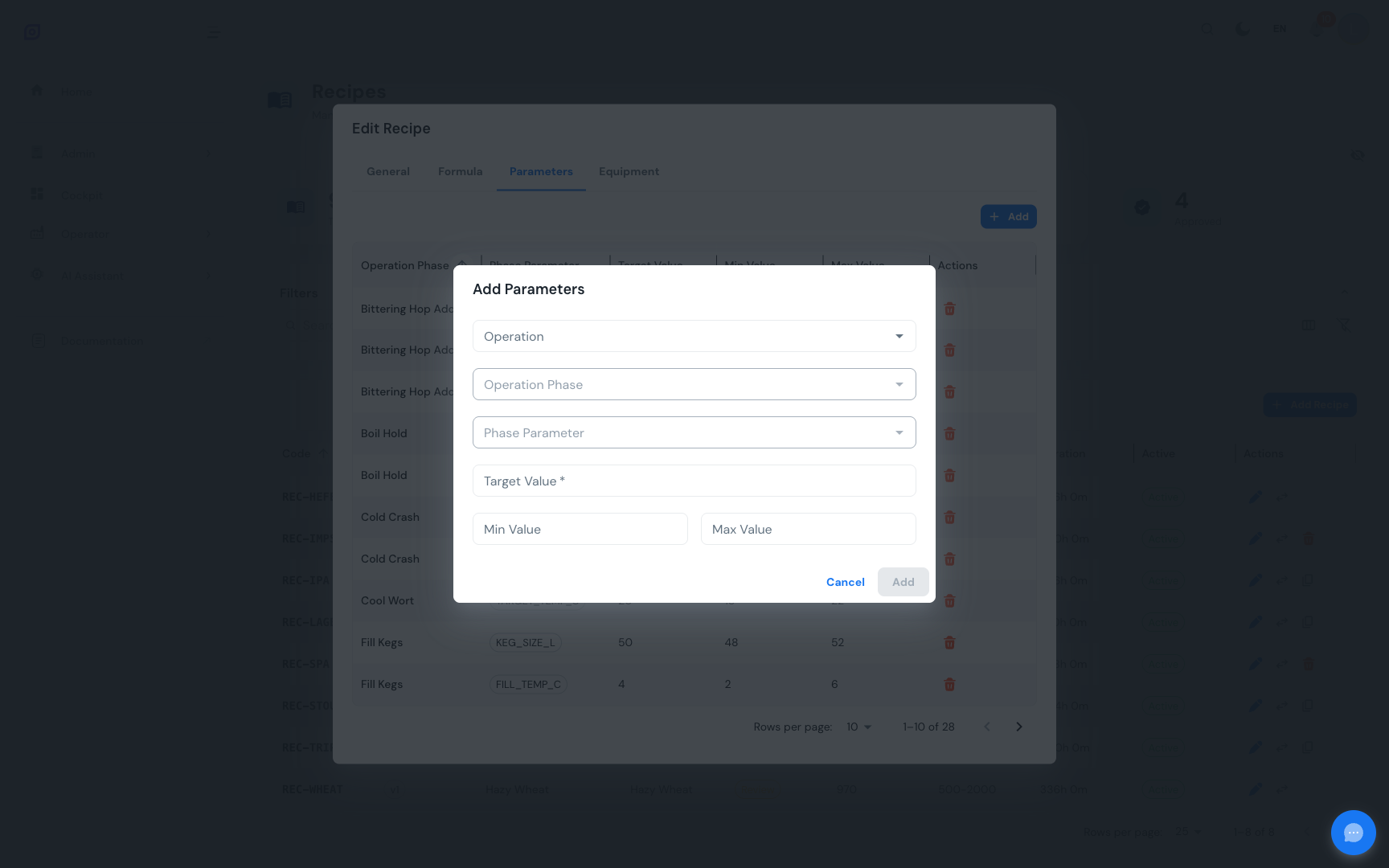
The add dialog uses cascading dropdowns that progressively narrow the selection:
- Click Add Item above the parameters grid
- Select an Operation -- lists all operations from the linked procedure
- Select an Operation Phase -- lists phases within the selected operation
- Select a Phase Parameter -- lists parameters defined on the selected phase
- Enter the Target Value (required)
- Optionally enter Min Value and Max Value to define the acceptable range
- Click Add Item to save
Cascading selection flow
Each dropdown is disabled until the previous selection is made. Changing a higher-level selection resets the lower-level selections.
Target, Min, and Max Values
| Field | Purpose | Required |
|---|---|---|
| Target | The desired setpoint value | Yes |
| Min | Lower boundary of the acceptable range | No |
| Max | Upper boundary of the acceptable range | No |
When min and max values are provided, they define a tolerance window around the target. This information can be used during production monitoring to raise alerts when actual values fall outside the acceptable range.
Even when min/max are not required, it is good practice to define them. They provide valuable boundaries for process monitoring and quality control.
Removing a Parameter
- Click the delete button (red trash icon) on the parameter row
- Confirm the removal in the dialog (shows the phase name and parameter name)
- The parameter override is removed
Only Draft recipes allow parameter modifications. For non-draft recipes, the action buttons are hidden. To change parameters on an approved recipe, create a new version.
Example parameters
For an "Orange Juice" recipe using the "Juice Production" procedure:
| Operation Phase | Parameter | Target | Min | Max |
|---|---|---|---|---|
| Set Temperature | Temperature | 85 C | 80 C | 90 C |
| Agitate | Speed | 120 RPM | 100 RPM | 140 RPM |
| Agitate | Duration | 300 s | -- | -- |
| Pasteurize | Temperature | 72 C | 70 C | 75 C |
| Pasteurize | Hold Time | 15 s | 15 s | 20 s |
Related pages
- Recipe List -- Browse and manage recipes
- Formulas -- Bill of materials management
- Equipment Requirements -- Equipment mapping
- Procedures -- Configure operations and phases
- Batch Model (ISA-88) -- Parameters in the ISA-88 model
Prerequisites
- Recipes Overview
- Introduction — get the overall picture of OpSee