Equipment Requirements
Equipment requirements define which equipment is needed for each unit procedure in a recipe. They map each step of the production process to an equipment class and optionally to a preferred specific equipment unit, with a minimum cleanliness status constraint.
Concept
In the ISA-88 model, a batch procedure is divided into unit procedures, each of which runs on a single equipment unit. The recipe's equipment requirements specify:
- Which unit procedure needs equipment
- Which equipment class is required (inherited from the unit procedure definition)
- Which specific equipment unit is preferred (optional)
- What minimum cleanliness status is required before production can start
Accessing equipment requirements
- Navigate to the Recipe List
- Click the edit button on a Draft recipe
- Switch to the Equipment tab
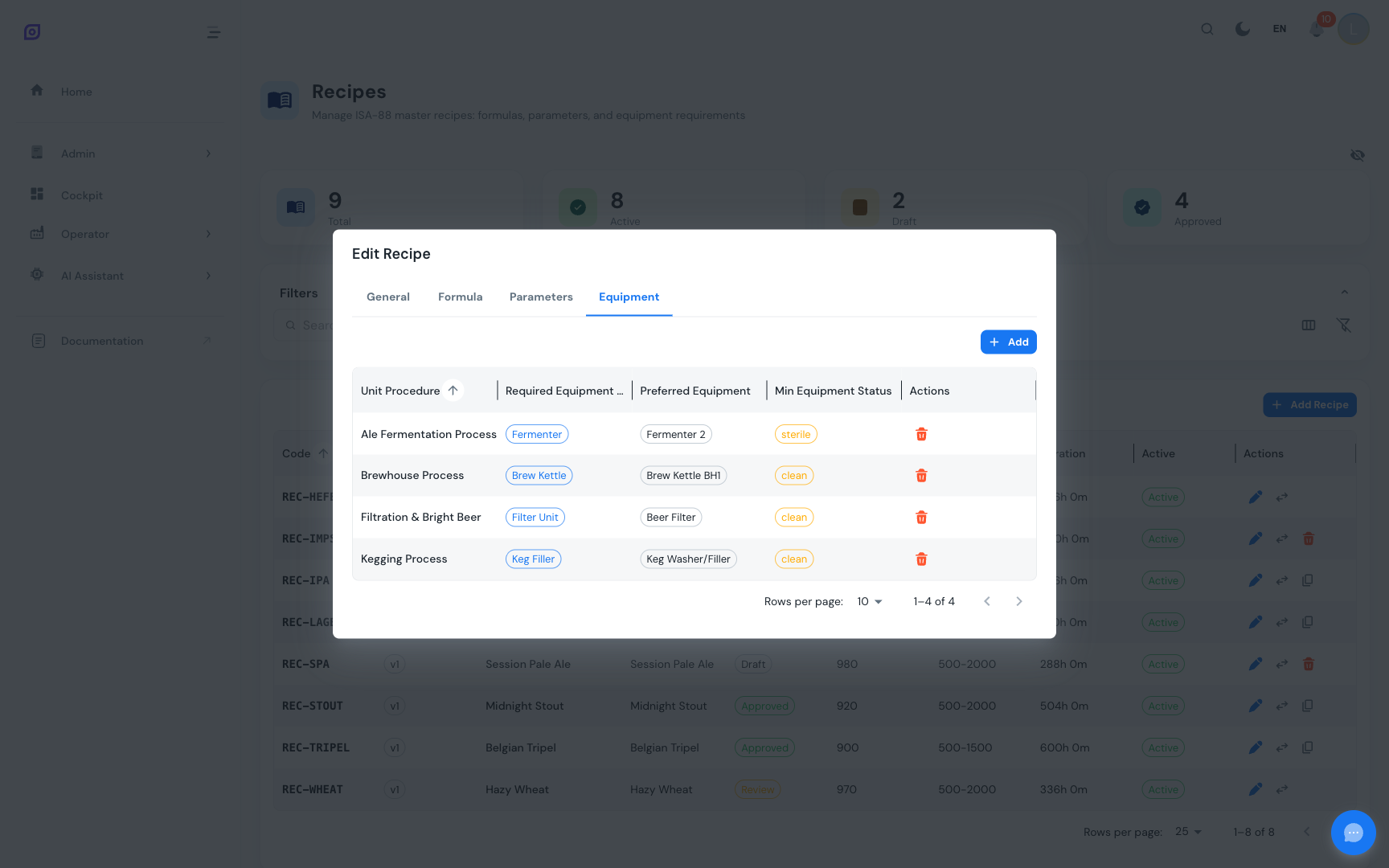
Equipment requirements grid
The DataGrid displays the following columns:
| Column | Description |
|---|---|
| Unit Procedure | The name of the unit procedure (bold text) |
| Required Equipment Class | The equipment class required (blue chip), inherited from the unit procedure |
| Preferred Equipment | A specific equipment unit preferred for this recipe (chip), or -- |
| Min Equipment Status | Minimum cleanliness level required (warning chip), or -- |
| Actions | Delete button (only visible for Draft recipes) |
Items are sorted by unit procedure name by default.
Adding an Equipment Requirement
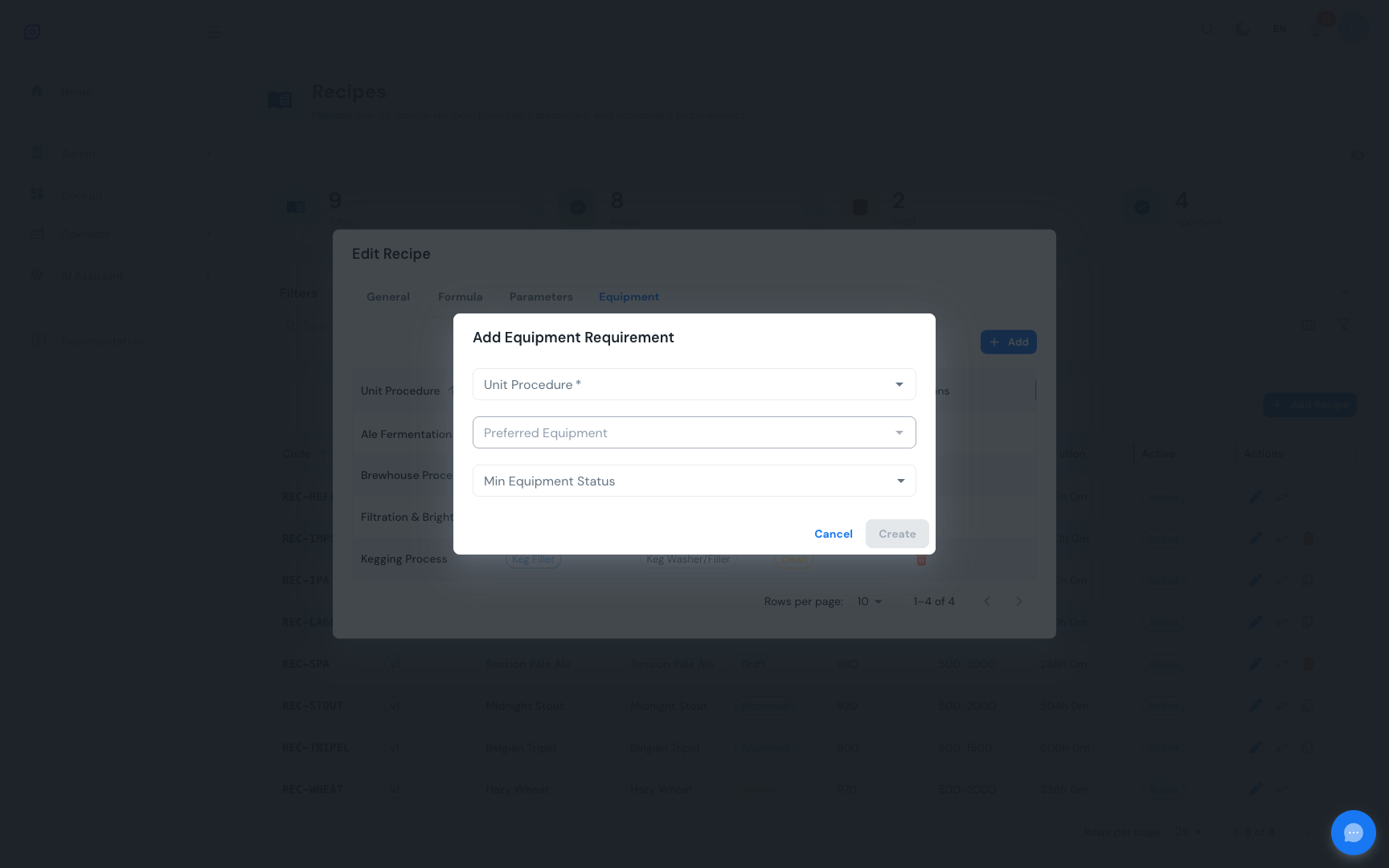
- Click Add Item above the equipment grid
- Select a Unit Procedure from the searchable dropdown (shows name and code)
- The dialog displays the equipment class associated with the selected unit procedure
- If the unit procedure has an equipment class, the Preferred Equipment dropdown is filtered to show only equipment belonging to that class
- Optionally select a Preferred Equipment unit
- Optionally select a Minimum Equipment Status from the dropdown
- Click Create to save
Equipment status levels
The minimum equipment status defines the cleanliness requirement before production can begin. Statuses are ordered from least to most stringent:
| Status | Description |
|---|---|
dirty | No cleaning requirement (any state accepted) |
clean | Equipment must have been cleaned |
disinfected | Equipment must have been disinfected |
sterile | Equipment must be sterile |
qc_ok | Equipment must have passed quality control verification |
When no minimum status is set, any equipment state is accepted. For food, pharmaceutical, or other regulated production, always specify the appropriate cleanliness level.
How equipment filtering works
When you select a unit procedure in the add dialog:
- The unit procedure's required equipment class is displayed as informational text
- The Preferred Equipment dropdown automatically queries for equipment units that belong to that equipment class
- If the unit procedure has no equipment class assigned, the equipment dropdown is disabled
This cascading behavior ensures you can only select equipment that is compatible with the unit procedure's requirements.
Removing an Equipment Requirement
- Click the delete button (red trash icon) on the requirement row
- Confirm the removal in the dialog (shows the unit procedure name and equipment class)
- The requirement is removed immediately
Only Draft recipes allow equipment requirement modifications. For non-draft recipes, the action buttons are hidden. To change equipment requirements on an approved recipe, create a new version.
Example equipment requirements
For an "Orange Juice" recipe:
| Unit Procedure | Equipment Class | Preferred Equipment | Min Status |
|---|---|---|---|
| Mixing Process | Mixing Tank | Mixing Tank #3 | clean |
| Pasteurization | Pasteurizer | -- | disinfected |
| Filling | Bottle Filler | Filler Line 1 | qc_ok |
Related Pages
- Recipe List -- Browse and manage recipes
- Formulas -- Bill of materials management
- Parameters -- Phase-specific setpoints
- Changeover Rules -- Product-switch duration rules
- Equipment -- Equipment hierarchy and classes
- Batch Model (ISA-88) -- Equipment requirements in the ISA-88 model
Prerequisites
- Recipes Overview
- Introduction — get the overall picture of OpSee