Reasons
Reasons are the specific causes that operators choose when logging a downtime event. They are the most granular level of the OEE classification system: the leaf nodes that answer "why did the equipment stop?"
Managing reasons
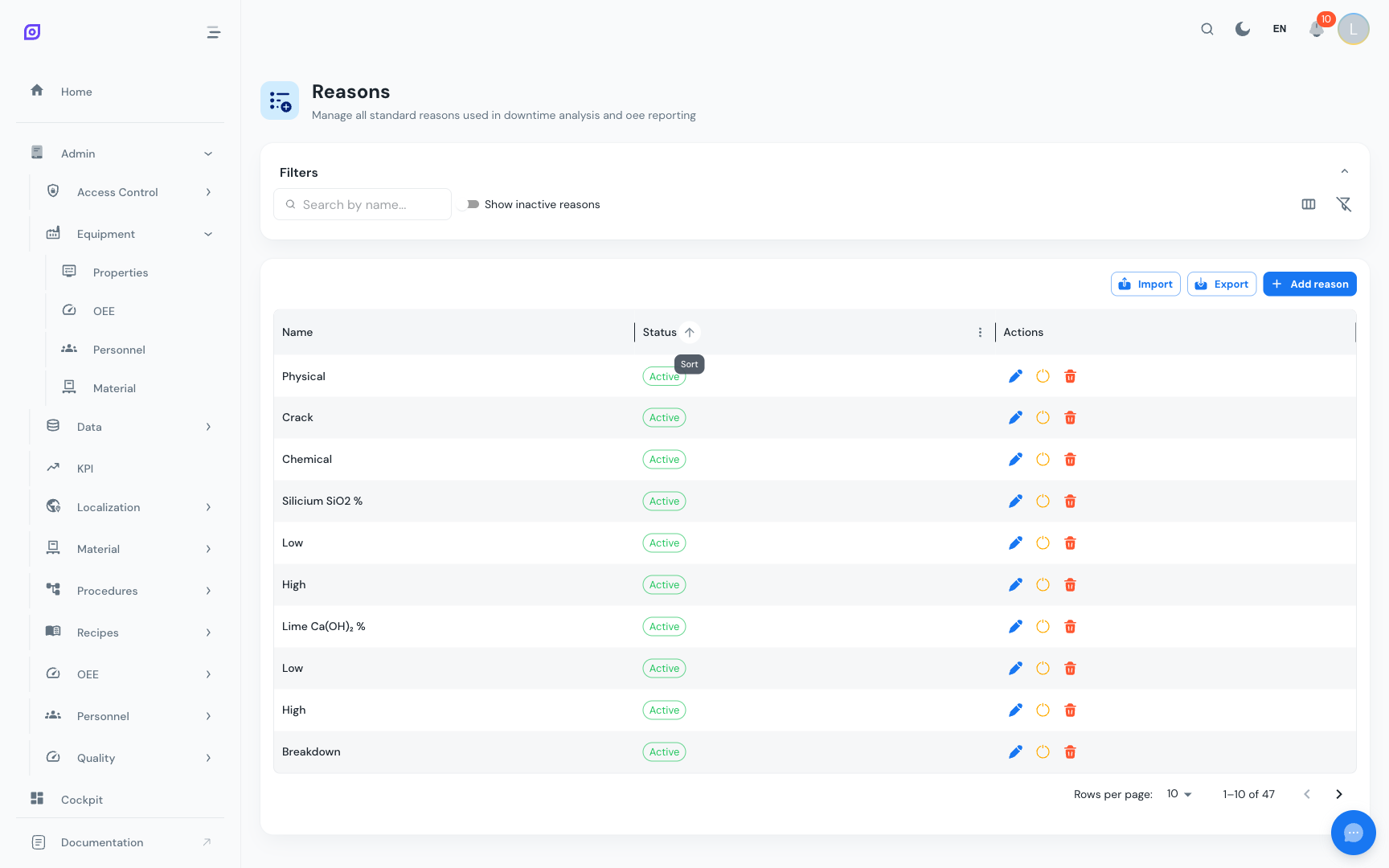
Navigate to Admin → OEE → Reasons.
Creating a Reason
Click + Create and enter:
| Field | Required | Description |
|---|---|---|
| Name | Yes | The reason text operators will see (e.g., "Belt broken") |
The name should be:
- Specific enough to be actionable (maintenance can identify what to fix)
- General enough to be reusable (not tied to a single incident)
- Clear to operators who may not be engineers
Searching and Filtering
- Use the search bar to find reasons by name
- Toggle Show inactive to include deactivated reasons in the list
Activating and Deactivating
Instead of deleting reasons (which could affect historical data), you can deactivate them:
- Click the Deactivate button to hide a reason from operator selection
- Click Activate to restore a previously deactivated reason
- Deactivated reasons remain in historical records and reports
:::tip Deactivate rather than delete If a reason is no longer relevant (e.g., a machine was replaced), deactivate it instead of deleting. This preserves historical downtime data while preventing new events from using that reason. :::
Import/Export
Use the Export and Import buttons to bulk-manage reasons:
- Export downloads all reasons in CSV, XLSX, or JSON format
- Import allows bulk creation from a file, useful for standardizing across plants
Best practices
Naming conventions
Use consistent naming patterns:
| Pattern | Example | When to use |
|---|---|---|
| Component + Failure | "Belt broken", "Motor overheating" | Equipment-specific causes |
| Category + Description | "Material shortage", "Material wrong grade" | Supply-related causes |
| Action-based | "Recipe change", "Planned cleaning" | Planned activities |
How many reasons?
| Plant Size | Recommended | Notes |
|---|---|---|
| Small (1–5 lines) | 15–25 reasons | Cover the most common causes |
| Medium (5–20 lines) | 25–50 reasons | More specificity per equipment type |
| Large (20+ lines) | 50–100 reasons | Consider multiple reason trees |
:::caution Too many reasons slow operators down If operators spend more than 15 seconds finding the right reason, the list is too long. Use Reason Trees to organize reasons into a navigable hierarchy rather than adding more reasons to a flat list. :::
Avoid catch-all reasons
Resist creating reasons like "Other", "Miscellaneous", or "Unknown". These become the default choice and hide valuable root cause data. Instead:
- Make the reason tree easy to navigate
- Train operators on reason selection
- Review and add new reasons when operators consistently can't find an appropriate one
Next steps
- Reason Trees — Organize reasons into hierarchical structures
- Loss Types — The OEE classifications that reasons map to
- Getting Started — Back to the setup tutorial
Prerequisites
- OEE Configuration Overview
- Introduction — get the overall picture of OpSee
Related
- OEE Fundamentals
- Equipment — complementary module