Equipment
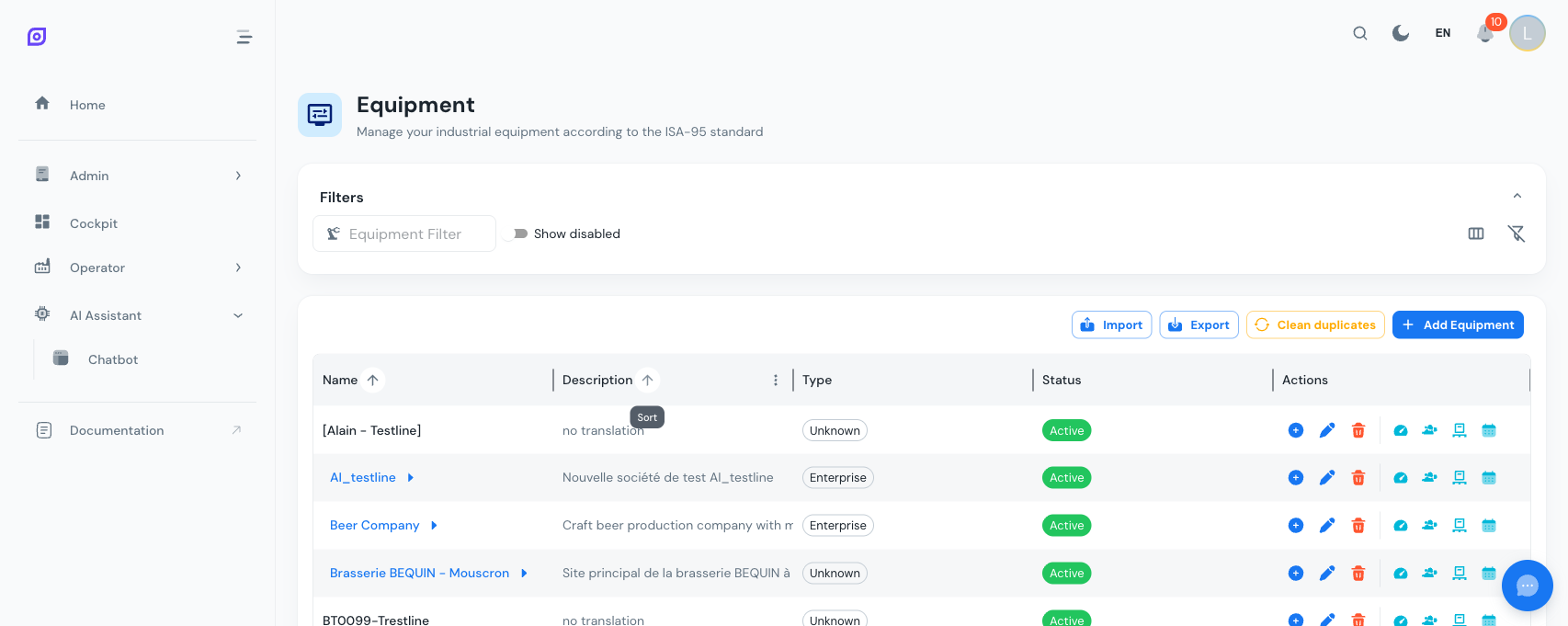
The Equipment module is the backbone of OpSee. Every piece of data (OEE calculations, downtime events, material consumption, personnel assignments) is linked to an equipment item. Before you can track production, you need to model your plant's physical assets here.
What is the equipment hierarchy?
OpSee follows the ISA-95 / ISA-88 physical model to organize your plant into a tree structure. Each equipment item has a type that maps to an ISA-88 level:
| Level | Standard | Typical Example | Description |
|---|---|---|---|
| Enterprise | ISA-95 | Acme Corp | Top-level organization |
| Site | ISA-95 | Brussels Factory | Physical location |
| Area | ISA-95 | Packaging Hall | Functional zone within a site |
| Process Cell | ISA-88 | Filling Line 1 | A coordinated group of units |
| Unit | ISA-88 | Filler A | A single machine performing a process |
| Equipment Module | ISA-88 | Dosing Head | A sub-component of a unit |
| Control Module | ISA-88 | Valve V-101 | A sensor, actuator, or controller |
You are free to use as many or as few levels as your plant requires. A small factory might only need Site, Area, and Unit. A complex process plant might use all seven levels.
Key features
| Feature | Description |
|---|---|
| Hierarchical navigation | Drill down from enterprise to control module with breadcrumb navigation |
| Equipment types | Define reusable types with ISA-88 level mapping and batch management support |
| Classes and capabilities | Tag equipment with classes (e.g., Reactor, Conveyor) and measurable capabilities (e.g., Heat, Mix) |
| OEE configuration | Assign tags, reason trees, objectives, and procedures per equipment |
| Personnel assignment | Link operators and teams to specific equipment |
| Material assignment | Define which materials can be processed on each equipment |
| Schedule configuration | Set production schedules and shift patterns per equipment |
| Import / Export | Bulk create or back up equipment via Excel files |
| Soft delete and restore | Disable equipment without losing history, and restore when needed |
| Duplicate cleanup | Built-in tool to detect and remove duplicate equipment entries |
| Audit trail | Every create, update, and delete is logged with user, timestamp, and old/new values |
How equipment connects to other modules
- OEE: Each equipment can have availability, performance, and quality configurations with tag bindings and reason trees. See OEE Settings.
- Personnel: Assign operators and personnel roles to equipment. See Assignments.
- Material: Define which materials an equipment can process, with production rates. See Assignments.
- Tags: Sensors and PLC signals are linked to equipment for real-time data collection.
- Recipes: Recipe steps reference equipment capabilities and material assignments.
:::tip Learn the theory first New to ISA-95? Read Equipment Model (ISA-95) to understand the hierarchy standard behind OpSee's equipment structure. :::
Learn more
| Page | What you will find |
|---|---|
| Getting Started | Step-by-step tutorial to create your first equipment |
| Hierarchy | Parent-child structure, types, and how to organize your plant |
| Properties | Equipment properties, classes, and capabilities |
| OEE Settings | OEE configuration per equipment: tags, thresholds, reason trees |
| Assignments | Material and personnel assignments to equipment |
| Import / Export | Bulk import and export equipment data via Excel |
Prerequisites
- Introduction: get the overall picture of OpSee
Next steps
Related
- Equipment Model (ISA-95)
- OEE Configuration: complementary module