Alarm Administration
Route: Admin → Alarms (/admin/alarms)
An alarm definition says when an alarm is raised, when it returns to normal and when it counts as acknowledged. This page covers the Definitions tab, the edit dialog with its condition builders, the fast alarms operators create from the tag screen, and what happens to open occurrences when you disable or delete a definition.
Prerequisites
- Admin Overview
- The
perm:alarms:adminpermission; only the Admin role has it by default - Alarm Lifecycle for the states, delays and hysteresis the conditions rely on
- Data Tags for the tags and limits the conditions compare against
The Definitions Tab
The page has five tabs. Definitions is described on this page; Channels and Routing (notification delivery) are described in Alarm Notifications; Colours — alarm classes, priority colours and state colours on one page — is described in Colours below; History & KPIs holds the ISA-18.2 performance metrics and the closed-occurrence history and is described in The History & KPIs Tab below.
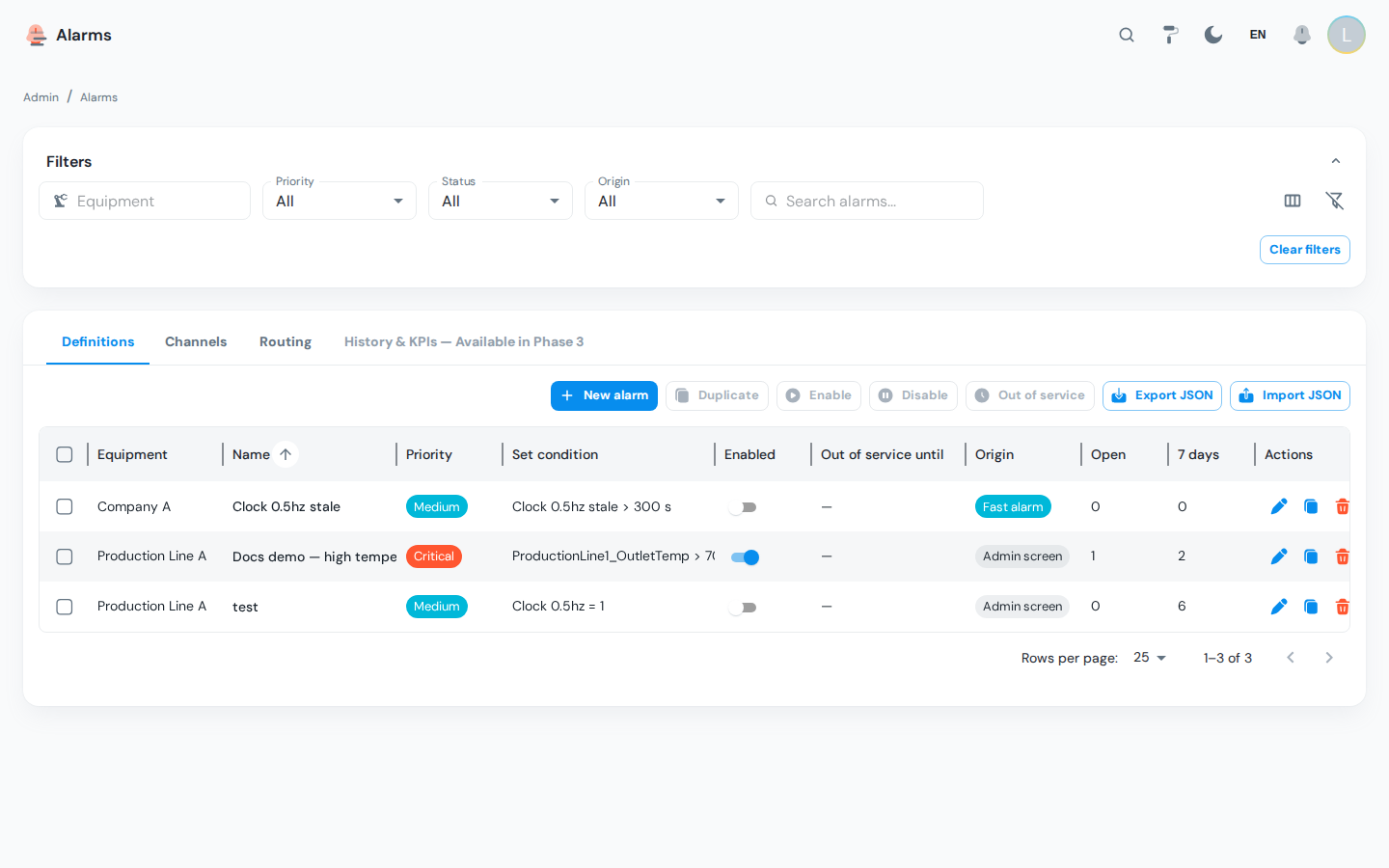
Grid columns
| Column | Meaning |
|---|---|
| Equipment | The equipment the alarm belongs to; drives the operator's equipment scope |
| Name | Definition name |
| Priority | Critical, high, medium or low |
| Set condition | Human-readable summary of the set condition, for example Temperature > 80 (hysteresis 2) |
| Enabled | Whether the evaluator looks at this definition |
| Disabled until | End of an out-of-service window, if one is active |
| Origin | Admin for definitions created here, Fast for presets created from the tag screen |
| Open occurrences | Open alarms right now |
| Occurrences (7 d) | How many times the alarm fired in the last 7 days; a chatter indicator |
| Class | The alarm class, drawn in its own colour — see Colours. Set in the edit dialog; blank means no class, and the alarm falls back to its priority colour |
| Description | Free text |
A No licence chip next to the name means the alarm's equipment is not licensed for alarming; see Licensing.
Filters
Equipment (shared picker, subtree included), Priority, Class (including No class), Status (enabled / disabled), Origin (admin / fast) and a text search on the name, description, class or tag.
Colours
Alarm classes replaced the free-text category field in v1.1. Existing categories were migrated into classes automatically, one per distinct value, keeping the text as both the class name and its code. A definitions file exported before the change still imports: its category is resolved to the class of the same code.
One page holds the whole alarm palette, in three bands: the classes, the four ISA-18.2 priorities and the five lifecycle states. Every row shows its own background and label colour as hex, the measured contrast ratio, and a live preview of the chip an operator will actually see.
Everything on this page edits in place and saves as you set it. Click a swatch to open the picker, or type a hex code straight into the field — a plant whose colour convention is written into an operating procedure has the codes on paper. The change is saved when you leave the field (or press Enter), and every open alarm screen repaints on its next refresh. There is no Save button and no dialog, except when creating a class, which needs a code and a name first.
Classes
A class says what kind of problem an alarm is — comms, process, system — which is usually the first thing an operator reads, before the priority tells them how fast to move. Each class carries its own colour, and that colour is what the operator screen paints the alarm with.
| Column | Meaning |
|---|---|
| Toggle | Whether the class is in use. A disabled class stays on its definitions but is not offered for new ones |
| Name | Shown to operators, translated per language. Editable in place, drawn in the class's own colours |
| Background / Label | The colour pair, as a swatch and a hex code |
| Contrast | The measured ratio, with a warning icon when it is below AA |
| Severity rank | Orders classes among themselves, lower being more severe. Deliberately independent of ISA-18.2 priority: the class says what kind of problem it is, the priority says how fast to act |
| Count | How many alarm definitions use this class, across the whole plant |
Deleting a class leaves its definitions with no class — they fall back to their priority colour. Occurrences already raised keep the class they were raised with, so history is never rewritten. Re-classifying a definition behaves the same way: only new occurrences take the new class. Renaming a class, by contrast, does reach old occurrences — a rename is a correction, a re-classification is a change of fact.
Priority
The four ISA-18.2 priorities, most severe first. Priority colour is what the alarm screen has always used, and it is what an alarm falls back to when its class has no colour of its own. Priorities do not blink: blinking says "somebody has not looked at this yet", which is a property of the state, not of how urgent the alarm is.
Lifecycle state
The five states, in lifecycle order. An active-unacknowledged alarm, an acknowledged-but-still-active one and one that returned to normal unacknowledged are three different jobs for the operator, and this is where a plant can make them look different.
All five ship with no colour of their own, shown as Takes the priority colour. That is deliberate: priority is the colour story, and a state that carried its own hue would paint over it — a low-priority alarm would shout in the same red as a critical one, which is the alarm fatigue ISA-18.2 priorities exist to prevent. Until v1.1 the states were seeded with hues lifted from the priority palette, and that is exactly what happened; see the release note below.
Give a state a colour with Set a colour and it takes over from priority for alarms in that state — that is the escape hatch for a plant whose convention works that way. Note it is currently one-way: a colour set here cannot be cleared back to "takes the priority colour" from this screen.
Blink makes a state's rows pulse until acknowledged — viewers who ask for reduced motion get a static tint instead. It can only be set on a state that has a colour, so the switch is disabled on an uncoloured one.
:::info Fixed in v1.1 — every unacknowledged alarm looked critical Before this, the five lifecycle states shipped pre-coloured with hues copied from the priority palette, so the state always won and every unacknowledged alarm rendered critical-red whatever its priority — while the row's own left border, two pixels away, was still drawn in the priority hue. The states now ship unset. A state colour you had deliberately configured yourself is kept. :::
:::note Contrast is measured, not enforced Each row shows the measured contrast ratio of its background and label, and flags a pair below the WCAG AA minimum of 4.5:1. It is advice: the colour is saved either way.
Until 2026-09-29 a pair below AA was refused outright. That gate turned out to refuse colours plants actually use — Material Blue Grey 500 (#607D8B) measures 4.37:1 on a white label and 3.98:1 on a black one, so that shade had no admissible label at all and a class using it could not be saved. A tool that will not record a plant's own colour convention is the wrong tool.
The advice is still worth reading. A mid-tone background often fails with both labels, and swapping the label will not rescue it — the background has to move. #546E7A (5.40:1 on white) and #78909C (5.19:1 on a dark label) are the neighbouring Material shades that pass.
The shipped defaults still satisfy AA. Four of the five pre-v1.1 colours did not, against the white label they were drawn with — medium priority measured 1.97:1 — so high and medium keep their background and take a dark label, and low and the neutral grey moved one shade darker. :::
Toolbar actions
| Action | Effect |
|---|---|
| New | Opens the edit dialog for a new definition |
| Duplicate | Copies the selected definition, including its conditions, as a disabled copy named <original> (copy) |
| Enable / Disable | Bulk enable or disable the ticked definitions. Disabling closes every open occurrence of the definition. |
| Out of service | Stops evaluation of the ticked definitions until a date and time you pick, with an optional reason; open occurrences are closed |
| Export | Downloads the definitions matching the current filters as a JSON file |
| Import | Reads a JSON file produced by Export; the result dialog shows how many definitions were created and lists every entry that failed with its error |
| Row Delete | Deletes one definition after confirmation; the confirmation shows how many open occurrences will be closed first |
The Edit Dialog
General
| Field | Meaning |
|---|---|
| Name | Required. Shown to operators in the grid and the bell. |
| Priority | Critical, high, medium or low |
| Description | Free text for admins |
| Equipment | The equipment that owns the alarm |
| Class | What kind of problem this is — comms, process, safety. The list is the enabled classes from the Colours tab; No class is a real choice and leaves the alarm on its priority colour. A disabled class stays on the definitions that already carry it but is not offered here. |
| Latched | A latched alarm stays open until someone acknowledges it, even after it returned to normal. Unlatched alarms are acknowledged automatically when they return to normal. Default: on. |
| Enabled | Whether the evaluator looks at this definition |
| Cause, Consequence, Operator action | The three ISA-18.2 guidance texts shown in the operator's detail drawer: what causes the alarm, what happens if it is ignored, and what to do about it. Translatable. |
Conditions
One builder per role. Each builder has a kind selector, the fields of that kind, and a live summary of what it will do. Together the three conditions drive one occurrence:
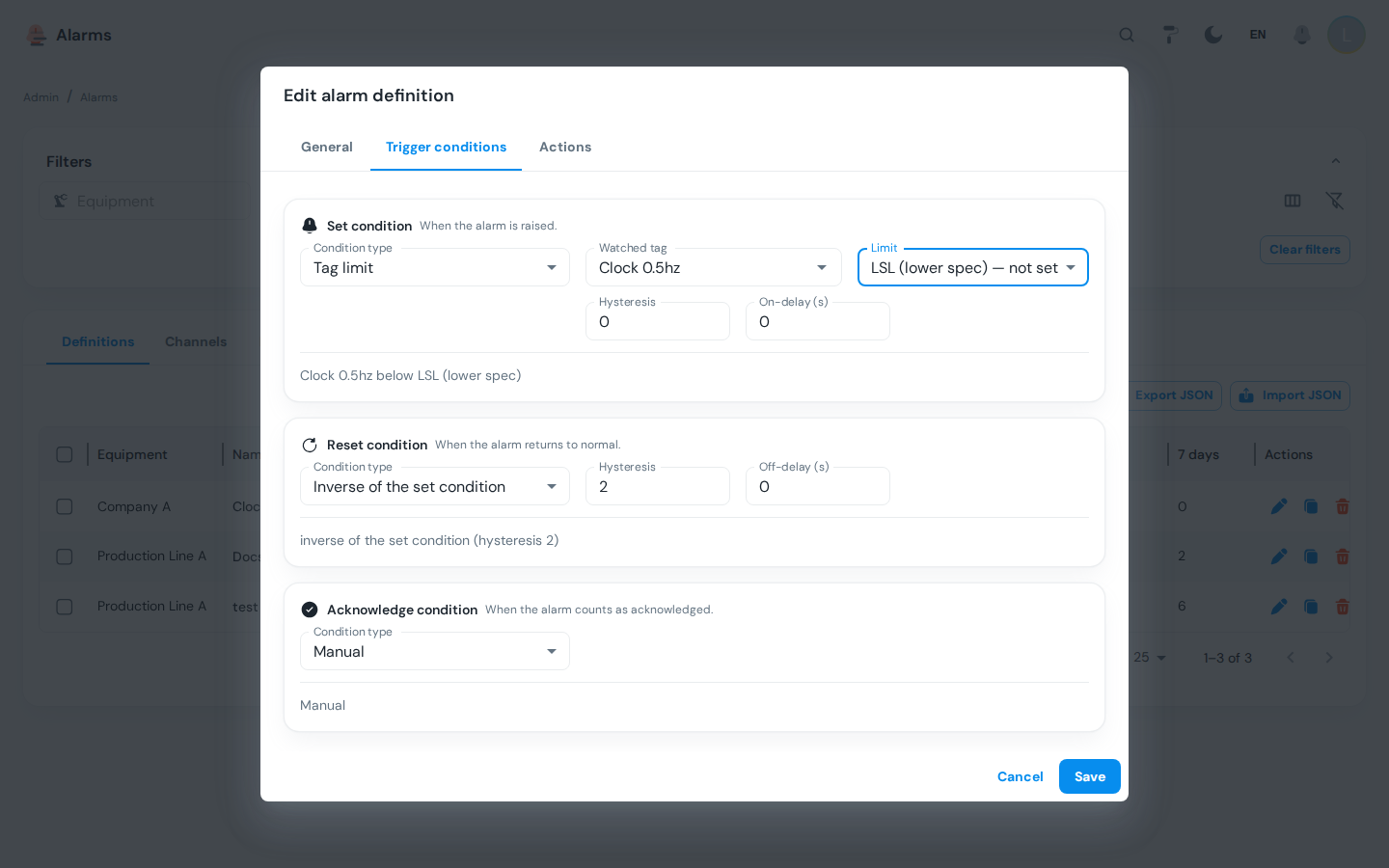
| Role | Kinds available | Default when left empty |
|---|---|---|
| Set (when the alarm is raised) | Tag compare, Tag limit, Stale, Expression | None: a definition without a set condition never fires |
| Reset (when it returns to normal) | Tag compare, Tag limit, Inverse, Auto, Timer, Manual, Expression | Inverse |
| Acknowledge (when it counts as seen) | Tag compare, Manual, Auto, Expression | Manual |
| Kind | Example | Configuration fields |
|---|---|---|
| Tag compare | Temperature > 80 raises; Door = false resets | Tag, operator (<, <=, =, <>, >=, >, between, outside), value or range, hysteresis, on delay (s). Text tags support =, <> and contains; boolean tags = true/false. |
| Tag limit | Pressure above USL | Tag, limit (USL, UCL, warning high, warning low, LCL, LSL), hysteresis, on delay (s). The current limit value is shown next to the field. The limit is read at evaluation time, so changing the limit changes the alarm. |
| Stale | No value for Flow in 300 s | Tag, max age (s). The only kind that reacts to the absence of values. |
| Expression | temp > 80 and avg('flow', '5m') < 5 | Condition text, one binding per name the condition uses (name to tag), on delay (s). Multi-tag logic and time windows; see Expression Conditions. |
| Inverse | Set condition no longer true, with deadband | Hysteresis, off delay (s). The default reset. |
| Auto | Acknowledge 30 s after reset; reset 10 s after set (pulse alarm) | After (on reset / on set), delay (s) |
| Timer | Reset 60 s after set regardless of the value | After (s) |
| Manual | Only a person can do it | None. The default acknowledge. |
External (an alarm raised by another system through the API) is still listed in the selector but disabled: no evaluator supports it yet, and the API refuses it rather than storing a definition that would silently never fire. Until it ships, let the other system write a tag and alarm on that tag.
When a delay field is left empty the system defaults apply: ALARM_DEFAULT_ON_DELAY_S and ALARM_DEFAULT_OFF_DELAY_S from System Parameters.
Expression Conditions
An expression condition is a boolean formula over several tags, with optional time windows. Use it when the alarm is a relation between values rather than one value against a threshold: a temperature that only matters while the flow is low, a deviation from a setpoint tag, a counter that stops moving while the machine says it is running. It is available for set, reset and acknowledge.
The builder has two parts: the Condition field and the Bindings list underneath it. Every name used in the condition must be bound to a tag:
- Condition:
temp > 80 and avg('flow', '5m') < 5 - Bindings:
tempto the temperature tag,flowto the flow tag - On delay: seconds the condition must stay true before the alarm is raised, exactly as for the other kinds
It is the same engine that evaluates calculated tags, so the syntax below is the one you already write in a calculation, widened with comparisons and and / or / not. Nothing is executed as code: the text is parsed against a whitelist when you save, which is why a typo is refused in the dialog instead of producing an alarm that never fires.
What you can write
| Names | A bare name (temp) is the latest value of the tag bound to it |
| Comparisons | <, <=, >, >=, ==, !=. A single = is not a comparison: write ==. |
| Combining | and, or, not and parentheses. A comparison cannot be an operand of another comparison, so write a > 0 and b > 0, never (a > 0) == (b > 0). |
| Arithmetic | +, -, *, /, //, %, ** and unary minus, on either side of a comparison |
| Scalar functions | abs(x), min(a, b, ...), max(a, b, ...), round(x) |
| Window functions | avg('name', '5m'), sum, wmin, wmax, count, delta — the bound name comes in quotes as the first argument and the window as the second. last('name') takes only the name and means the latest value, like the bare name. |
| Window format | A whole positive number followed by s, m, h or d: 30s, 5m, 1h, 2d |
| Size limits | 2000 characters, and at most 200 elements in the formula |
Anything else — attributes, indexing, other function names, text literals outside a window function — is refused when you save.
Rules the dialog enforces
- Every name must be bound to a tag. There are no free constants by name and no scalar parameters:
tempis a tag or it is a saving error. The name inside a window function counts too, soavg('flow', '5m')needsflowin the bindings. - Every binding must be used. A binding the condition never reads is refused, because it would still be watched and equipment-guarded while contributing nothing.
- Binding names are identifiers: letters, digits and underscores, not starting with a digit.
- The bound tags must exist, and they are tags of this definition: they are guarded exactly like the definition's own equipment, so keep the bindings on the equipment the alarm belongs to. Binding a sensor on a line you do not administer is refused.
- Only numeric and boolean tags can take part (a boolean counts as
1or0). A text or timestamp tag can be bound, but it can never make the expression true or false.
Worked examples
| Goal | Condition | Bindings |
|---|---|---|
| Hot and starved: the bearing runs above 80 °C while the five-minute average flow is under 5 | temp > 80 and avg('flow', '5m') < 5 | temp to the temperature tag, flow to the flow tag |
| Drift: the measured value leaves a two-unit band around its own setpoint tag, which no single-tag compare can express | abs(actual - setpoint) > 2 | actual to the measurement, setpoint to the setpoint tag |
| Silent production: the machine reports running, but the piece counter has not moved in a quarter of an hour | running == 1 and delta('counter', '15m') < 1 | running to the state tag, counter to the counter tag |
Give the definition a source tag when one of the bound tags is the tag of the alarm: the occurrence then snapshots that tag's value like any other alarm. Without a source tag the occurrence records the bindings that made the condition true instead, for example flow=3.1, temp=84.2, so the history still shows the numbers behind the raise.
What happens when a value is missing
An expression that cannot be resolved is indeterminate, and an indeterminate condition holds the current state: it never raises an alarm and never clears one. That is the same rule null and bad-quality values follow for the single-tag kinds, applied to every way an expression can fail:
- a bound tag has no sample yet, or its latest value is null or bad quality;
- a bound tag is text or a timestamp, so it has no numeric meaning;
- a window has no rows in it (nothing was written in the last five minutes), or the aggregate could not be fetched this cycle;
- the evaluation itself fails, for example a division by zero.
None of these raise an error, log an alarm or wake anybody: the alarm simply stays as it was until real values arrive. So an expression alarm that is stuck is a data problem, not an evaluator problem — add a Stale alarm on the bound tags if you need to be told that they went quiet.
Actions
What this alarm does on top of the routing rules: notify a channel at a given moment (raised, returned to normal, acknowledged, snoozed), escalate to another channel after N seconds without acknowledgement, or write a tag. The fields and the escalation timer are described in Alarm Notifications → Actions on a Definition. Most alarms need no action at all: routing rules already deliver them.
The History & KPIs Tab
The fourth tab answers the question every alarm review starts with: is this alarm system usable by the people who have to work it? It shows the ISA-18.2 performance metrics on top and, underneath, the closed occurrences that produced them — both over one window, chosen once in the filter bar.
The window and the filters
| Control | Effect |
|---|---|
| From / Until | The window both halves describe. Default: the last 7 days. At most 90 days — a longer window is refused, not silently shortened, so the numbers always cover the period you asked for. |
| Equipment, Priority, Search | The same filters as the Definitions tab. Equipment includes the whole subtree and is intersected with your own equipment scope. |
| Operators on duty | The divisor of the rate metric: how many people were watching these alarms. Between 1 and 1000; the default of 1 gives the per-person rate for a single operator. |
| Refresh | Re-reads both halves |
| Export CSV | One button per half; see Exports |
The tab needs perm:alarms:admin, like the rest of the page. The occurrence list underneath additionally needs perm:alarms:read: without it the metrics still compute and the list is replaced by You do not have permission to read alarm occurrences, so only the KPIs are shown.
Alarm performance
Five cards, each with the number and one line saying what it is. The header repeats the window that was actually evaluated (Window 07/09/2026, 09:00 → 14/09/2026, 09:00 (168 h)), so a number is never read against the wrong period. A metric that cannot be computed — nothing was raised, nothing was acknowledged, the window is degenerate — shows an em dash (—), never a 0: "nothing to measure" and "measured, and it is zero" are different answers.
| Metric | What it counts | How to act on it |
|---|---|---|
| Alarms per operator-hour | Annunciations — alarms raised plus re-arms of an alarm nobody acknowledged — divided by the hours of the window and by the operators on duty. A re-arm puts the alarm back in front of the operator, which is what this metric measures. | EEMUA 191 / ISA-18.2 put the maximum manageable rate at about one alarm per ten minutes — 6 alarms per operator per hour — with the long-term average target well below that. The card colours the value: plain up to 1 (the long-term target), amber above it, red above 6. A red rate is a rationalization backlog, not an operator problem: start with the chattering top ten below, then add on-delays and hysteresis, then review whether every definition still deserves its priority. |
| Average time to acknowledge | Mean delay between raise and acknowledgement, over the alarms raised in the window and acknowledged by its end | A delay that keeps growing means alarms arrive faster than they can be handled, or that they arrive where nobody is looking. Compare it per line by filtering on equipment, and check the routing rules before blaming the shift. |
| Flood periods | Share of the ten-minute periods in the window in which more than ten annunciations happened (raises and re-arms together, so a single flapping alarm can flood a period on its own). Quiet periods count in the denominator, so a calm window is 0.0%, not a dash. | A flood is the state in which operators stop reading alarms and start clicking them away, so any non-zero percentage deserves a look at what floods: an upset that raises fifty correlated alarms is a grouping or suppression problem, not fifty problems. |
| Standing alarms | Occurrences still open at the end of the window that had been raised more than 24 hours earlier | These are the alarms the shift has learned to ignore, and they hide the new ones. Either the condition is wrong (fix or retire the definition), or the plant condition is real and permanent (take the definition out of service for the duration of the repair, with a reason, rather than leaving it standing). |
| Raised / acknowledged | The raw counts behind the two rates above, with re-arms reported separately | Use them as the sanity check on the rest. Note the subtlety on the card: both count alarms raised inside the window. An alarm that was raised before the window and is still open is a standing alarm, not a raise — so the standing count can be non-zero while raised is 0, and the occurrence list underneath (which matches anything overlapping the window) can hold more rows than raised. |
Every metric is evaluated as of the end of the window, from each occurrence's own timeline rather than from its state today, so asking for the same closed window next month returns the same numbers.
Most frequent alarms
The ten definitions with the most annunciations in the window, with their equipment, their raises, their re-arms and their own average time to acknowledge — the chattering top ten. Both counts matter, and for a true chatterer the re-arms are the story: an alarm raises once and then re-arms its open occurrence every time the condition comes back, so a flapping alarm can sit at the top of this list with 0 raises. It is the shortest route to a lower rate: a handful of definitions usually accounts for most of the raises, and each of them is one on-delay, one hysteresis value or one retired alarm away from being quiet. A definition with no equipment is plant-wide and is listed for every administrator; a definition that has since been moved to equipment outside your scope drops out of the list.
An alarm that appears here and also carries a ×N chatter badge on the operator screen is being seen as noise by the people working it. Start there.
The occurrence history
Below the metrics, every closed occurrence that overlaps the window, newest raise first: Raised, Returned to normal, Duration, Name, Equipment, Priority and Time to acknowledge; the Show all columns toggle adds State, Acknowledged by and Message. Clicking a row opens the read-only detail drawer with the guidance texts and the full timeline; the row action Open in the trend chart opens the alarm's source tag around the occurrence, with fifteen minutes of padding on either side.
At most 500 rows are read at a time. When the window holds more, a banner says Only the first N alarms are shown — narrow the window rather than letting a truncated list pass for the whole story.
Exports
Two CSV exports, each of exactly what is on screen for the current window:
| Button | File | Columns |
|---|---|---|
| Export CSV on the performance card | alarm-chatterers-YYYY-MM-DD.csv | definition_id, definition, equipment, raises, avg_time_to_ack_s |
| Export CSV above the occurrence grid | alarm-history-YYYY-MM-DD.csv | id, definition, equipment, priority, state, raised_at, cleared_at, acked_at, acked_by, time_to_ack_s, duration_s, message |
Timestamps are exported as the raw ISO-8601 instants and durations as whole seconds — not as your locale renders them — so the same export can be compared between sites and languages. Cells are neutralised against spreadsheet formula injection, exactly like the server-side exports.
Fast Alarms From the Tag Screen
Users with perm:alarms:admin or perm:tag-limits:write can create alarms in two clicks from the Alarms section of the tag edit dialog under Admin → Data Tags, right below the limits.
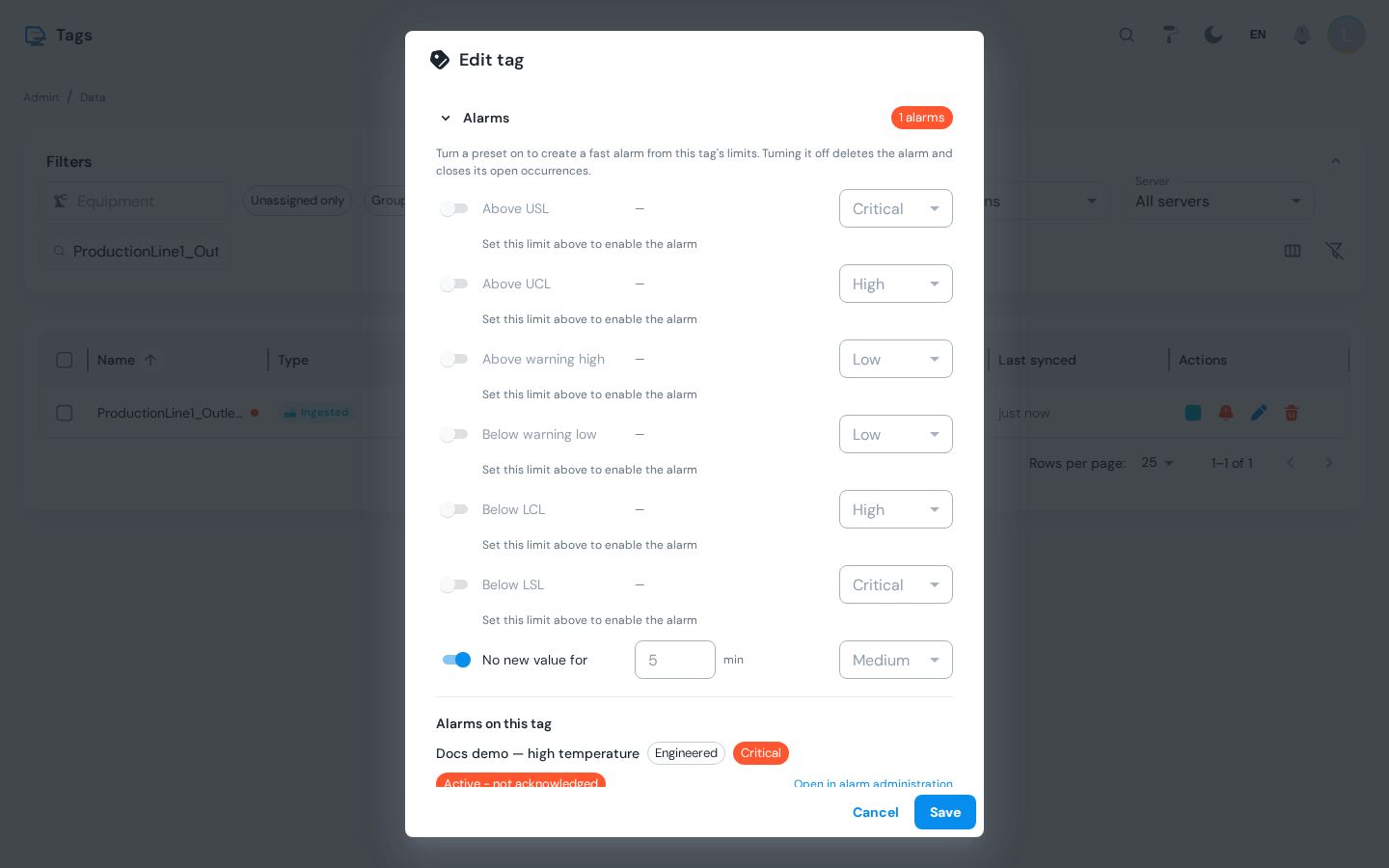
| Preset | Condition | Default priority |
|---|---|---|
| Above USL | Tag limit usl, above | Critical |
| Above UCL | Tag limit ucl, above | High |
| Above warning high | Tag limit warning_high, above | Low |
| Below warning low | Tag limit warning_low, below | Low |
| Below LCL | Tag limit lcl, below | High |
| Below LSL | Tag limit lsl, below | Critical |
| No new value for N min | Stale, default 5 min | Medium |
Each toggle creates one definition with origin Fast, reset Inverse and acknowledge Manual, owned by the equipment the tag is bound to (a picker appears when the tag is bound to several). The priority can be changed before turning the toggle on. Turning a toggle off deletes the definition and closes its open occurrences. Presets on a limit that is not set are greyed out; non-numeric tags only offer the watchdog.
Fast alarms show in the Definitions grid with origin Fast and can be edited there like any other definition. Definitions created in the admin screen are listed on the tag with an Open in alarm administration link.
Out of Service Versus Disable
| Disable | Out of service | |
|---|---|---|
| Duration | Until someone enables it again | Until the date and time you choose, then evaluation resumes on its own |
| Reason | None | Optional, recorded on the definition |
| Open occurrences | Closed | Closed |
| Typical use | Retire an alarm | Maintenance window on the equipment |
What Happens to Open Occurrences
- Disable or Out of service: every open occurrence of the definition is closed with an automatic acknowledgement and the detail
disabled. The history stays. - Delete: open occurrences are closed first, then the definition and its conditions are removed. Past occurrences stay in the history until retention drops them.
- Edit while an alarm is open: the open occurrence keeps its snapshot (priority, trigger value); the next evaluation cycle uses the new condition.
Licensing
Alarms on an equipment are entitled per equipment, through the Alerts feature module (alerts) of that equipment's licence tier — the same way OEE, Quality or Production are licensed. Nothing about alarms is licensed install-wide except system alarming (below).
On an equipment whose tier does not include Alerts:
- a definition cannot be created, saved or enabled. The edit dialog disables Save and the Enabled switch and shows Alarms are not licensed for this equipment…; the API refuses the same calls with
403 LICENSE_REQUIRED. - the fast alarm toggles on the tag screen are disabled for tags on that equipment, with the same explanation.
- existing definitions stop firing: the evaluator skips them entirely, and any occurrence that was still open is closed with an automatic acknowledgement and the detail
unlicensed. Nothing is deleted — re-licensing the equipment resumes evaluation on the next cycle. - the Definitions grid marks every affected row with a No licence chip, and the operator Alarms screen marks the alarm with a tooltip reading Alarms for this equipment are not licensed; evaluation is paused, so the silence is explained rather than looking like a broken evaluator.
Moving a licence from one line to another therefore moves the alarming with it: alarms configured on lines that are not licensed at that moment do not raise.
System alarming — definitions with no equipment (plant-wide rules, and the platform's own database / worker / backup / licence alarms) — is not per-equipment and belongs to the install-wide foundation module alarm_notifications instead. The dialog says so when you build a definition without an equipment; it is informational, not a lock. Channels and routing rules themselves are not gated at all; see Alarm Notifications → Licensing.
Troubleshooting
| Symptom | Cause | Fix |
|---|---|---|
| The page shows a "no permission" banner | Your role lacks perm:alarms:admin | Grant it in Access Control |
| A definition never fires | No set condition, the definition is disabled or out of service, or the alarm_evaluator worker is stopped | Open the definition and check the Set builder and Enabled; check the worker in System Parameters |
| A row shows a No licence chip and never fires | The equipment's licence tier does not include the Alerts module, so the evaluator skips the definition | Licence the equipment for Alerts on License Overview, or move the definition to a licensed equipment; see Licensing |
| Save is disabled in the edit dialog | Same: the selected equipment is not licensed for alarms | Pick a licensed equipment, or licence this one |
| A tag limit alarm is greyed out on the tag screen | The limit is not set for the tag | Set the limit under Limits first |
| The alarm fires and clears repeatedly | The value oscillates around the threshold | Add hysteresis or an off delay to the reset condition; see Alarm Lifecycle |
| The alarm fires on a bad-quality value | It does not: null and bad-quality values never set an alarm | If you need to know the tag is dead, add a Stale alarm |
| Import rejects rows | The JSON was hand-edited or refers to equipment or tags that do not exist | Read the result dialog; fix the referenced objects and import again |
| Saving an expression condition is refused | The condition does not parse, uses a name with no binding, carries a binding it never reads, or points at a tag that does not exist | Read the message under the field and fix the condition or the bindings; see Expression Conditions |
| An expression alarm neither raises nor clears | One of its bound tags has no value, delivers nulls, is a text or timestamp tag, or its window is empty | That is by design: an expression that cannot be resolved holds the current state. Check the bound tags in Data Tags and add a Stale alarm if you need to know when one goes quiet |
The KPI cards show — | Nothing was raised (or nothing was acknowledged) in the window, so the metric cannot be computed | Widen the window or clear the equipment filter; — is "not measurable", not zero |
| History & KPIs shows the metrics but no list | Your role has perm:alarms:admin but not perm:alarms:read | Grant the read permission in Access Control |
| The window is refused | It is longer than 90 days, or Until is before From | Pick a shorter window; it is refused rather than shortened so the numbers match what you asked for |
Next steps
- Alarm Notifications: channels, routing rules, escalation and delivery status
- System Parameters: default delays, retention and the alarm workers
- Alarms Screen: what operators see and do with the definitions you create
Related
- Alarm Lifecycle: states, priorities, delays and hysteresis
- Data Tags: tags and limits
- Access Control: the alarm permissions and role matrix