The Six Big Losses
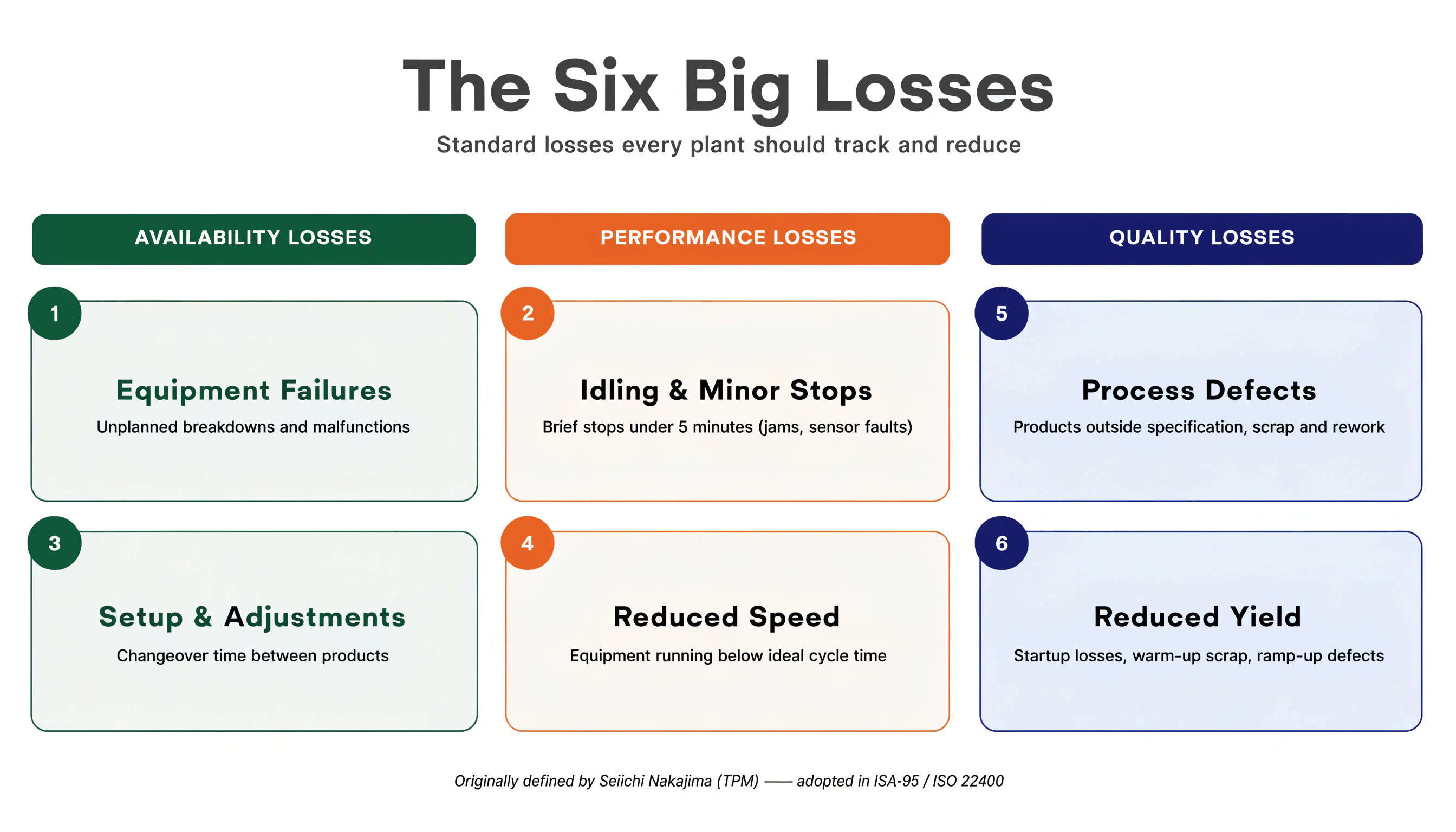
The Six Big Losses framework was developed by Seiichi Nakajima as part of Total Productive Maintenance (TPM). It identifies the six most common causes of manufacturing inefficiency and maps each one to one of the three OEE factors (Availability, Performance, Quality).
The Six Big Losses point you to where to look when your OEE is below target.
Why six losses?
OEE gives you a score (say, 68%). But that number alone does not tell you what to fix. The Six Big Losses provide the taxonomy: every point of OEE you lose can be traced back to one of these six root categories.
Availability losses
Availability losses reduce the time the equipment is actually running.
Availability = Run Time / Planned Production Time
Loss 1: equipment failure (unplanned stops)
What it is: Any unplanned stop caused by a machine breakdown, component failure, tooling damage, or unplanned maintenance.
Examples:
- Conveyor belt snaps
- Motor overheats and trips
- Hydraulic system fails
- Sensor malfunctions and stops the line
How to measure it in OpSee: Every unplanned stop creates an availability record. Assign loss type "Equipment Failure" (or equivalent in your reason tree). The Downtime Dashboard shows total unplanned downtime per reason.
How to reduce it:
- Preventive maintenance schedules (replace wear parts before failure)
- Predictive maintenance (monitor vibration, temperature, current draw to detect failures early)
- Root cause analysis on recurring failures
:::tip The #1 OEE killer in most factories Equipment failure is typically the largest single contributor to OEE loss in plants that are new to systematic tracking. Even if your availability is "good", investigate any unplanned stop lasting more than 5 minutes; the causes are often preventable. :::
Loss 2: setup & adjustments (planned stops)
What it is: Planned downtime for changeovers, setup, warmup, calibration, and approved maintenance during production time.
Examples:
- Product changeover (cleaning, format change, recipe change)
- Tool replacement after a production run
- Operator break during planned production time
- Calibration of measurement systems
How to measure it in OpSee: Assign loss type "Changeover" or "Planned Maintenance" to these events. The OEE Dashboard separates planned from unplanned losses.
How to reduce it:
- SMED (Single-Minute Exchange of Die): reduce changeover time by converting internal setup to external setup
- Standardize changeover procedures
- Use recipe parameters in OpSee to pre-configure equipment settings
:::info Planned stops still affect OEE Planned stops reduce Availability. The goal is not to eliminate them, but to minimize their duration. A 45-minute changeover reduced to 20 minutes saves 25 minutes of productive capacity on every run. :::
Performance losses
Performance losses reduce the speed at which equipment runs during planned production time.
Performance = (Ideal Cycle Time × Total Pieces) / Run Time
Loss 3: idling & minor stops (short stops)
What it is: Short interruptions (typically under 5 minutes) where the machine stops and an operator restarts it without a formal maintenance intervention.
Examples:
- A package jams in the conveyor, cleared in 30 seconds
- A sensor falsely triggers and stops the line, reset in 1 minute
- A component needs adjustment every 20 cycles
- Material refeed (empty hopper)
Why they are dangerous: Each minor stop only lasts seconds or minutes, but if they happen 50 times per shift, the cumulative loss can be enormous, and they are often invisible on paper logs because operators do not record them as "downtime."
How to measure it in OpSee: Configure a short-stop threshold (e.g., < 5 minutes). The system captures all stops, including micro-stops. Review the timeline and filter by duration.
How to reduce it:
- Identify which specific step causes most minor stops (Pareto analysis by reason)
- Check sensor reliability and alignment
- Verify material feed systems are properly sized
Loss 4: reduced speed (speed losses)
What it is: Equipment running consistently below its ideal cycle time (rated capacity), even without stopping.
Examples:
- Filler rated at 100 bottles/min only achieves 78 bottles/min due to worn filling nozzles
- Operator deliberately running slower to avoid jams
- Equipment running in "safe mode" after a near-miss
Why it is hard to detect: The machine is running. Operators and managers may not notice the speed loss without systematic measurement.
How to measure it in OpSee: OpSee calculates Performance using the ideal cycle time configured in OEE settings. Any gap between ideal and actual speed shows as a Performance loss.
How to reduce it:
- Compare current cycle time to nameplate or theoretical maximum
- Check for worn components that reduce throughput
- Review operator training (unintentional speed reduction)
Quality losses
Quality losses reduce the percentage of products that meet specifications.
Quality = Good Pieces / Total Pieces
Loss 5: process defects (production rejects)
What it is: Defective or out-of-specification products produced during stable (steady-state) production.
Examples:
- Label misalignment due to worn applicator roller
- Incorrect fill weight due to scale drift
- Surface scratches due to worn tooling
- Seal integrity failures on packaging
How to measure it in OpSee: Record defect quantities during production. The OEE Quality factor is calculated from total produced vs. good produced.
How to reduce it:
- Statistical process control (SPC) to detect drift early
- Regular calibration of measurement systems
- Preventive tooling replacement before defect rate rises
Loss 6: startup rejects (startup losses)
What it is: Defective products produced during the startup phase, for example after a changeover, at the beginning of a shift, or after a shutdown.
Examples:
- First 20 bottles after a changeover have incorrect fill levels while machine stabilizes
- Products produced during warmup fail dimensional checks
- Products at the start of a batch do not meet concentration requirements
How to measure it in OpSee: Capture defect counts during the startup window. Compare defect rates for first-hour production vs. steady-state.
How to reduce it:
- Document the number of startup rejects per changeover type and set a target
- Improve changeover procedures to reduce stabilization time
- Pre-heat tooling before restarting
From losses to action: the OEE improvement loop
The Six Big Losses become a continuous improvement tool when you link them to a structured analysis process:
- Measure: Use OpSee dashboards to see OEE broken down by Availability, Performance, and Quality
- Identify: build a Pareto of losses; which of the six is biggest for your equipment?
- Root Cause: Use the reason tree to find the specific cause within the loss category
- Act: Implement countermeasures (maintenance, training, process change)
- Track: Monitor whether the loss rate decreases over the next weeks
Using OpSee for Six Big Losses analysis
| Loss | OpSee tool | Where to look |
|---|---|---|
| Equipment Failure | Downtime Dashboard | Filter by loss category "Unplanned" |
| Setup & Adjustments | Downtime Dashboard | Filter by loss category "Planned" |
| Minor Stops | Downtime Dashboard | Filter by duration < 5 min |
| Reduced Speed | OEE Dashboard | Performance factor + trend chart |
| Process Defects | Production OEE | Quality factor + defect report |
| Startup Rejects | Production OEE | Quality factor per time-of-day |
:::tip Start with the biggest loss Do not try to fight all six losses simultaneously. Rank them by total time or cost impact, focus on the #1 loss for 4–6 weeks, then move to #2. This "focused improvement" approach (Kaizen) produces measurable, sustainable results. :::
Prerequisites
- OEE Fundamentals: understand OEE before studying the losses
Next steps
- MTTR and MTBF: deeper metrics for equipment failure analysis
- OEE Benchmarks: how your OEE compares to industry targets
Related
- OEE Configuration: configure loss categories and reason trees in OpSee
- Production → Downtime: analyze downtime by loss category