Equipment Model
:::info Quick Reference: 7 Hierarchy Levels Enterprise > Site > Area > Process Cell > Unit > Equipment Module > Control Module
Levels 1-3 follow ISA-95. Levels 4-7 follow ISA-88. You can use as many or as few levels as your plant needs. :::
What is an equipment model?
Start with a simple question: how do you describe your factory to a computer?
Imagine you are giving a tour to a new employee:
- "This is our Munich factory" (a site)
- "We are in the Packaging Hall" (an area)
- "This is Bottling Line 1" (a production line / process cell)
- "And this machine here is the Filling Station" (a unit)
- "See this component? That is Filler Head #3" (an equipment module)
- "And this little probe measures the temperature" (a sensor / control module)
That natural description of your factory is the equipment model. ISA-95 and ISA-88 simply give it a formal structure so that software like OpSee can organize, filter, and calculate metrics at every level.
The standards behind it
Two international standards define how manufacturing equipment should be organized:
| Standard | Scope | Levels | Focus |
|---|---|---|---|
| ISA-95 (IEC 62264) | Enterprise to Area | 1-3 | Business and logistics: where things are |
| ISA-88 (IEC 61512) | Process Cell to Control Module | 4-7 | Process control: how things work |
Together, they form a complete 7-level hierarchy from the boardroom to the sensor.
The equipment hierarchy
OpSee supports 7 hierarchy levels that cover the full range from enterprise down to individual sensors:
| Level | Term | Standard | Example | Purpose |
|---|---|---|---|---|
| 1 | Enterprise | ISA-95 | Acme Corp | The company or organization |
| 2 | Site | ISA-95 | Munich Factory | A physical location (factory, plant) |
| 3 | Area | ISA-95 | Packaging Hall | A logical section within a site |
| 4 | Process Cell | ISA-88 | Bottling Line 1 | A coordinated set of units (a production line) |
| 5 | Unit | ISA-88 | Filling Station | Where a specific operation happens |
| 6 | Equipment Module | ISA-88 | Filler Head #3 | A functional group within a unit |
| 7 | Control Module | ISA-88 | Temperature Sensor | Individual sensor or actuator |
:::info Flexible hierarchy You are not forced to use all 7 levels. Create as many or as few as your plant requires. A small factory might only use Site > Area > Unit. A complex pharmaceutical plant might use all 7. OpSee adapts to your structure. :::
Where does OpSee fit? The automation pyramid
In manufacturing IT, systems are organized in layers called the automation pyramid (based on ISA-95). OpSee operates at Level 3, the MES layer:
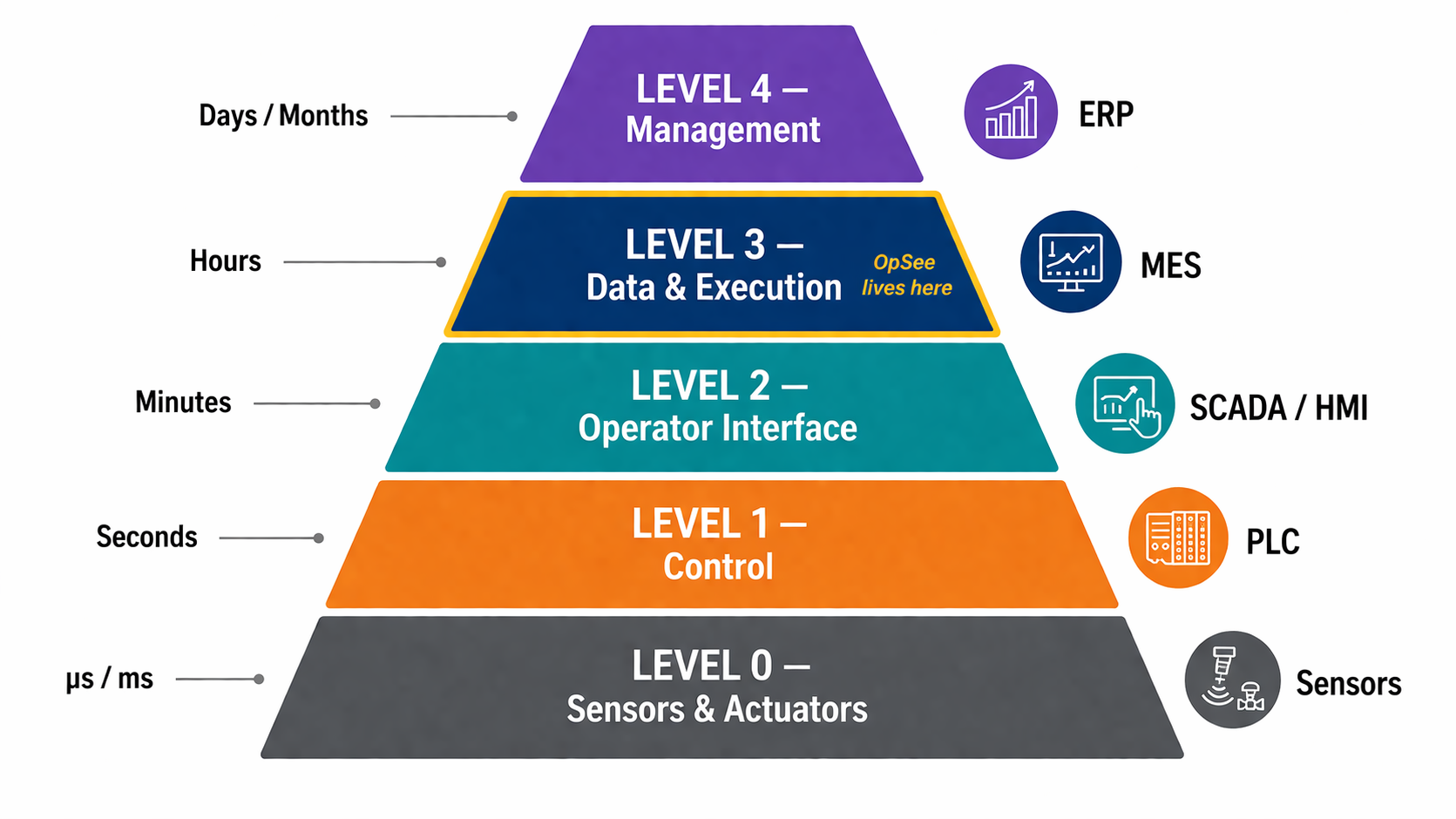 The ISA-95 automation pyramid. OpSee operates at Level 3 (MES), connecting the factory floor and business systems.
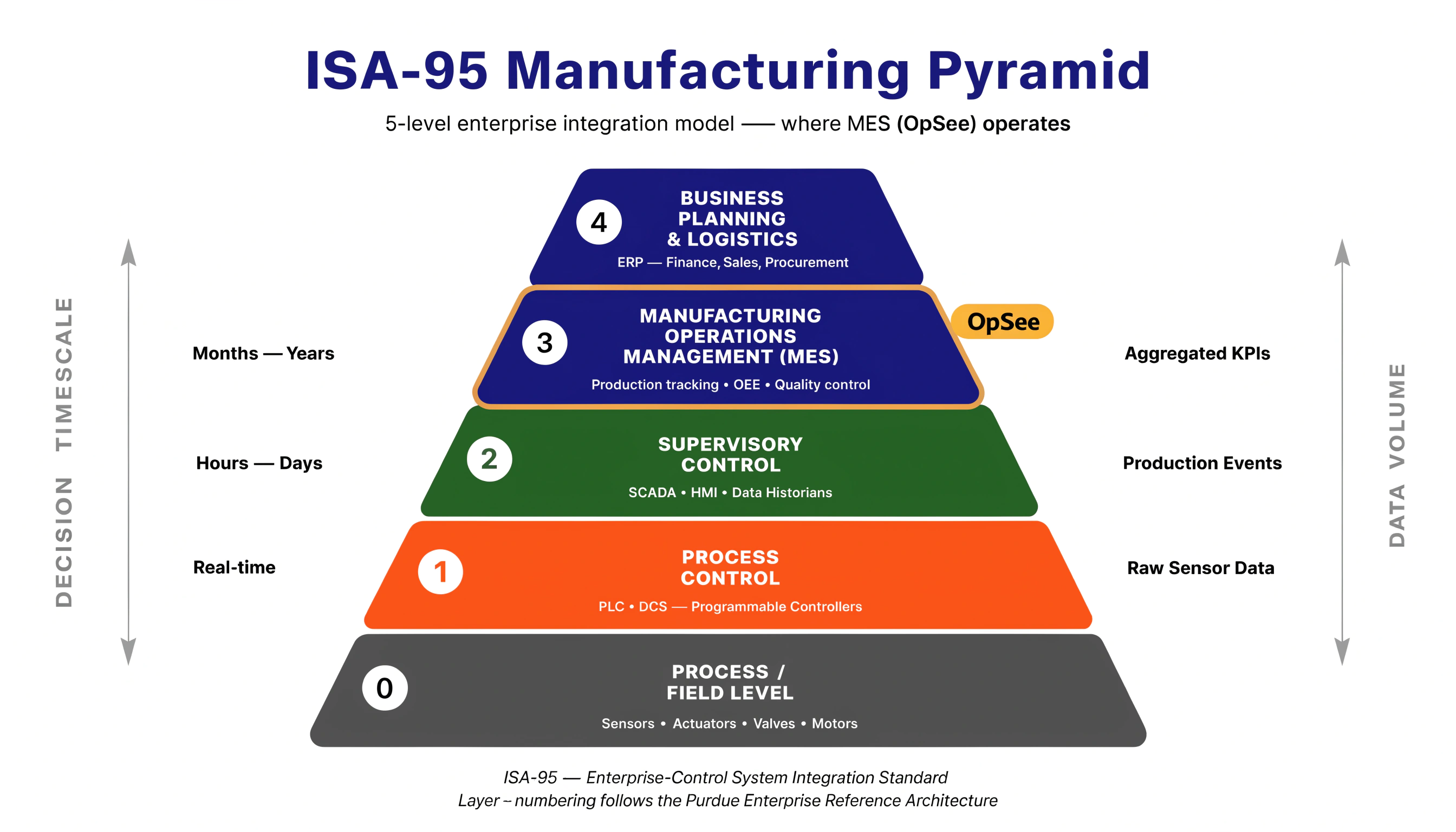
- Level 0-1: the physical world. Sensors measure temperature, pressure, speed; PLCs control motors and valves
- Level 2: SCADA systems supervise machines and display HMI screens for operators
- Level 3: MES (OpSee) connects the factory floor and business systems. It tracks OEE, manages production orders, handles recipes, and monitors quality
- Level 4: ERP systems handle business planning, finance, and supply chain
:::tip Why does this matter? The pyramid clarifies OpSee's role: it connects the shop floor to the front office. Data flows up from sensors (Level 0) through PLCs and SCADA (Levels 1-2), into OpSee (Level 3), and can be shared with ERP (Level 4). :::
How OpSee implements this
Equipment properties
Each equipment item in OpSee has:
- Name: display name (translated in all configured languages)
- Type: defines the role in the hierarchy (e.g., "Process Cell", "Unit", "Equipment Module")
- Parent: the equipment one level up in the hierarchy
- Icon & Color: visual identification in dashboards and menus
- Description: free-text description
- Batch management: whether this equipment supports batch operations (ISA-88)
Equipment types
Equipment types map to the ISA-88 hierarchy levels. When you create a type, you assign it one of the 7 levels above. This enables:
- Classification: group equipment by their role in the hierarchy
- OEE behavior: determine which reason trees apply to which equipment types
- Recipe matching: recipes reference equipment types, not individual equipment
Equipment classes & capabilities
- Classes define categories of similar equipment (e.g., "CNC Machines", "Conveyors", "Reactors")
- Capabilities define what an equipment can do (e.g., "Welding", "Cutting", "Filling") with optional capacity and unit of measure
These are used by the Recipes module to match equipment requirements to available equipment.
Equipment and other modules
The equipment hierarchy is the backbone of OpSee. Almost every other module references it:
| Module | Relationship |
|---|---|
| OEE | Availability records are tracked per equipment. OEE is calculated per equipment or aggregated up the hierarchy |
| Production | Production orders run on specific equipment |
| Personnel | Schedules assign shifts and operators to equipment |
| Material | Materials are assigned to equipment they run on |
| Recipes | Recipes define which equipment types they require |
| Data Tags | Sensors (MQTT/OPC-UA tags) are linked to equipment |
| Cockpit | Dashboard widgets can be filtered by equipment |
Best practices
:::tip Model your hierarchy before creating equipment Sketch your plant hierarchy on paper first. Start from the top (site/area) and work down. A well-structured hierarchy makes OEE roll-ups, filtering, and reporting much easier. :::
:::tip Use equipment types consistently Create types like "Site", "Area", "Process Cell", "Unit", "Equipment Module" and apply them consistently. This enables filtered views and reason tree assignments that work across your entire plant. :::
:::tip Start simple, expand later You do not need all 7 levels from day one. Start with 3-4 levels that match your current needs. You can always add more detail later as your OEE tracking matures. :::
Next steps
- Set up your equipment: hands-on guide to creating your equipment hierarchy in OpSee
- Batch Model (ISA-88): how procedures and recipes relate to equipment
- OEE Fundamentals: the metrics tracked per equipment
Prerequisites
- Introduction: get the overall picture of OpSee
Related
- OEE Fundamentals: OEE is calculated per equipment in the hierarchy
- Batch Model (ISA-88): the procedure and recipe model that runs on this equipment
- Administration → Equipment: hands-on equipment management in OpSee